

Resize a virtual machine to another plan
Resize moves a VM to another plan of the same provider. The VM is not rebuilt: its data stays on the disk and its IP address stays the same. It is switched off for about 60 to 90 seconds while the plan is changed.
Which VMs and which plans
Section titled “Which VMs and which plans”- ProVM only. The Resize tab is on every VM’s page, but on a VM of another provider the dialog says that only ProVM VMs can be resized in place.
- The same tier. A standard plan can change to another standard plan, and a Turbo plan to another Turbo plan. A standard VM cannot become a Turbo VM or the other way round, because the two tiers run on different hardware.
- The disk can only grow. A plan with a smaller disk than the one you have is never offered.
- The VM must be Running or Stopped.
Every ProVM plan with less CPU and memory also has a smaller disk. So in practice a resize goes to a larger plan of your tier, and you cannot go back to a smaller one afterwards. Compare the plans on Plans and prices before you choose.
For a smaller VM, or for a VM of another provider, create a new VM with the plan you want and move your data to it.
What you pay
Section titled “What you pay”Nothing extra for the resize itself. You pay each plan for the time you used it:
- The old plan is charged up to the moment of the resize. The dialog shows this as Tail charge (old plan).
- From then on the VM is charged at the new plan’s price, hour by hour. The dialog shows First hour (new plan) and New monthly.
To move to a more expensive plan, your credit must cover the tail charge plus 24 hours of the new plan. If it does not, the resize is refused and nothing changes.
Resize a VM
Section titled “Resize a VM”-
Open the VM from Virtual Machines, My Virtual Machines, and select the Resize tab.
-
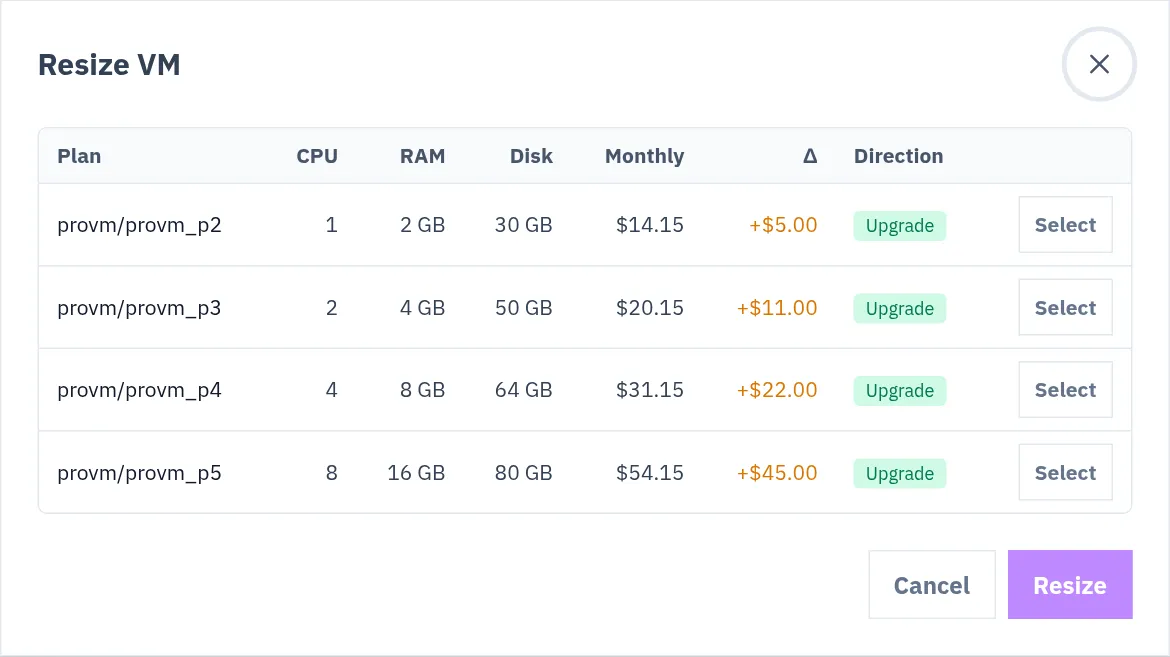
Select Resize VM…. The Resize VM dialog lists the plans you can move to, each with its CPU, RAM, disk and monthly price, and the difference to your current price.
-
Choose a plan with its Select button. The dialog works out the charges and shows them, with a warning that the VM will be powered off briefly.
-
Select Confirm upgrade.
What happens to the VM
Section titled “What happens to the VM”-
The VM is shut down. Open connections drop.
-
The plan is changed.
-
The VM is started again. If it was stopped before the resize, it stays stopped.
Afterwards, check inside the VM that the system sees its new size:
nproc # CPU coresfree -h # memorydf -h # diskIf the resize fails, the VM is put back on its old plan, and started again if it was running before. The short time in between is charged at the new plan’s price.
Checked against the product on 12 October 2026.