

Your publisher profile in the App Market
Every account has a publisher profile. It is the page other customers open when they select your name on one of your apps. It shows who you are and how your apps are doing.
Open your profile
Section titled “Open your profile”In the dashboard menu, select App Market, then Publisher Profile: https://www.doprax.com/v/blueprints/dev-profile/
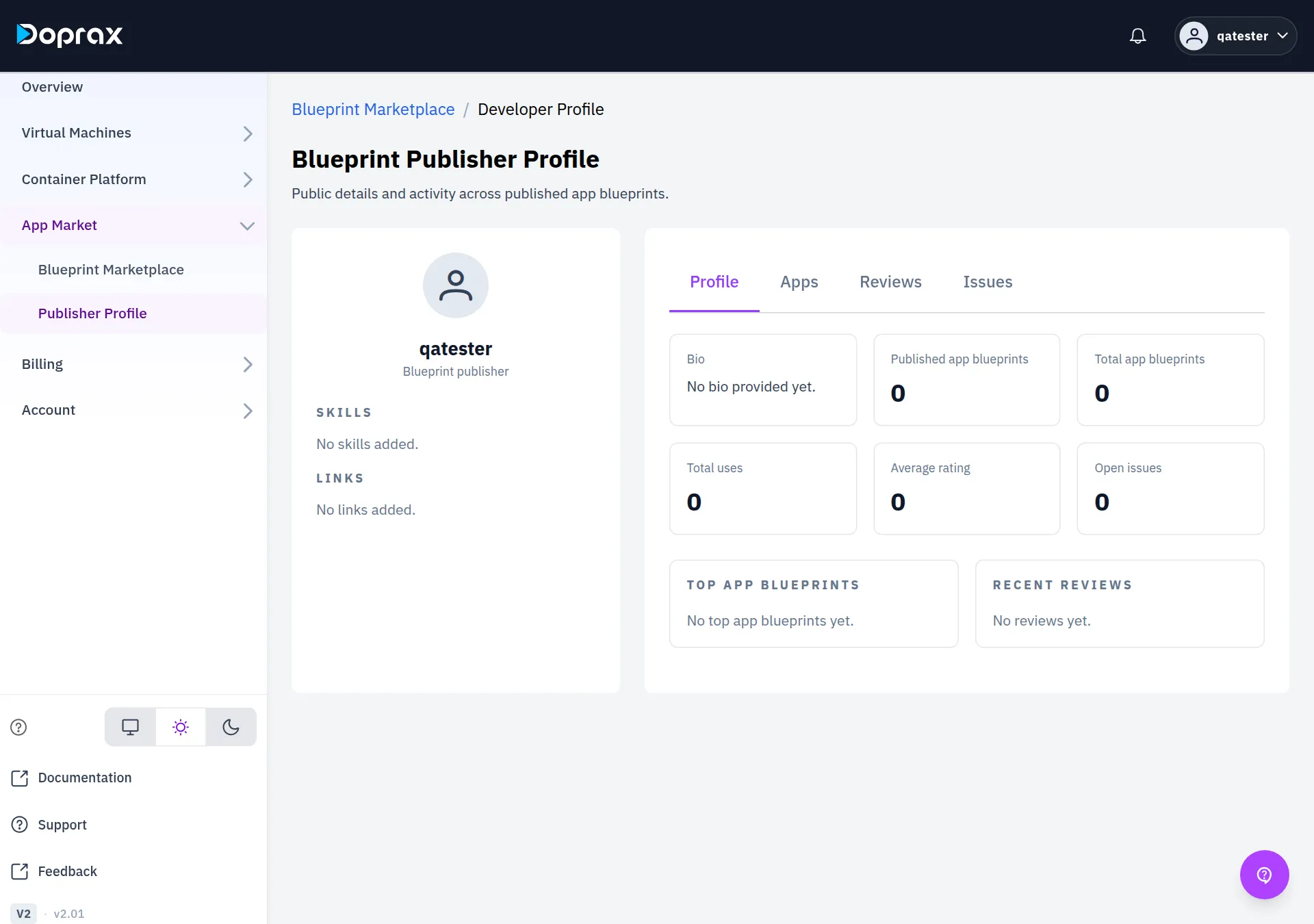
The page is named Blueprint Publisher Profile. You do not have to publish an app first: the profile exists as soon as you open it.
Who can see it
Section titled “Who can see it”A signed-in customer opens your profile by selecting your user name on the card of one of your apps. Other customers see cards of your apps only when the apps are published, so in practice your profile is found once you have a published app.
Apps published by doprax have no publisher profile.
What the page shows
Section titled “What the page shows”On the left:
| Part | Where it comes from |
|---|---|
| Picture | Your account picture |
| Name | Your Full Name. If it is empty, your user name |
| SKILLS | The skills you added. “No skills added.” when empty |
| LINKS | Your GitHub, LinkedIn, X and Website links, each with Visit. “No links added.” when empty |
On the right are four tabs.
Profile
Section titled “Profile”| Box | What it shows |
|---|---|
| Bio | The About text of your account. “No bio provided yet.” when empty |
| Published app blueprints | How many of your apps have the status Published |
| Total app blueprints | How many apps you added in total. Drafts are counted too |
| Total uses | Successful installs of your apps. A customer who installed the same app more than once counts once |
| Average rating | The average of all reviews of all your apps |
| Open issues | The number of issues reported on your apps. Closed and resolved issues are counted too |
| TOP APP BLUEPRINTS | Up to five of your apps with their number of uses. Apps with reviews come first, the best rated at the top |
| RECENT REVIEWS | The five newest reviews of your apps |
TOP APP BLUEPRINTS is taken from all your apps, not only the published ones. The title of an app that is still a draft can appear there.
The publisher’s published apps, each with its description.
Reviews
Section titled “Reviews”All reviews of the publisher’s apps, with the user name of the reviewer, the stars, the text, the app and the date.
Issues
Section titled “Issues”All issues reported on the publisher’s apps. Select an issue to open it and read or continue its conversation. As the publisher you change the status of an issue here. See Reviews and issues.
Edit your profile
Section titled “Edit your profile”The profile page itself has no edit buttons. You edit the fields in your account settings.
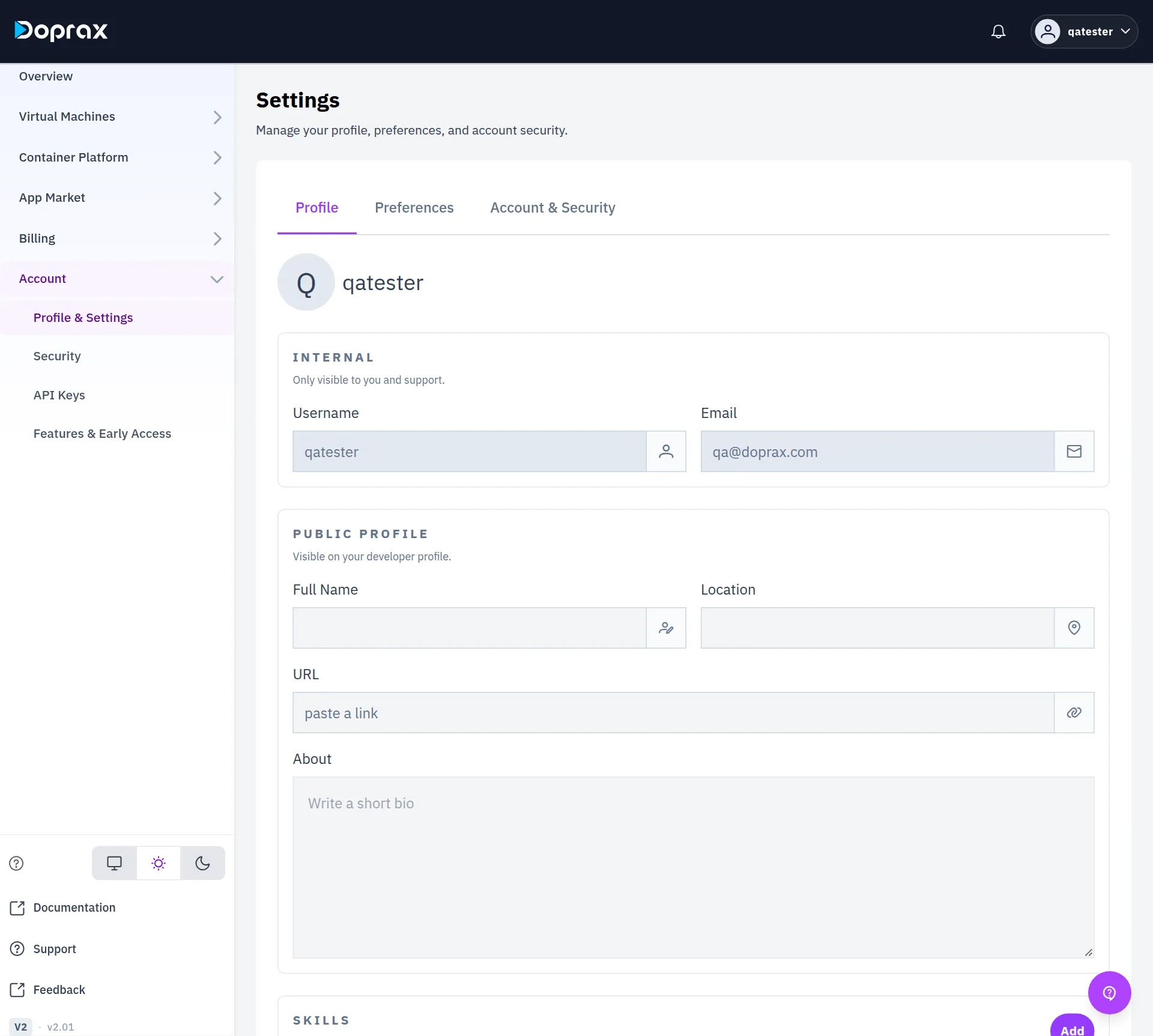
- In the dashboard menu, select Account, then Profile & Settings: https://www.doprax.com/v/settings/
- Stay on the Profile tab.
- Change the fields (see the table below).
- Select Save Changes at the bottom. Skills and links that you added or removed are stored only when you select Save Changes.
| Field | Where | Notes |
|---|---|---|
| Picture | Select the round picture at the top, choose an image, then Save | |
| Full Name | PUBLIC PROFILE | Shown as your name on the profile |
| About | PUBLIC PROFILE | Up to 256 characters. Shown as Bio |
| Location, URL | PUBLIC PROFILE | Saved with your account. The Publisher Profile page does not show them |
| Skills | SKILLS > Add | Type one skill, for example “Docker”, and select Save. Remove a skill with the cross on it |
| Links | LINKS > Add next to GitHub, LinkedIn, X or Website | One link each. Edit changes it, the bin removes it |
A link must be an https:// address. The GitHub link must be your page on github.com, the
LinkedIn link your page on linkedin.com, and the X link your page on x.com or twitter.com.
Otherwise the dashboard says “Invalid link”.
Your Username and Email are in the block INTERNAL on the same tab. They cannot be changed there.
What you cannot change
Section titled “What you cannot change”- The numbers. They are counted from your apps, their installs, reviews and issues.
- The list of apps. It follows the status of your apps.
- Reviews and issues. You cannot remove a review or an issue from your profile.
Checked against the product on 12 October 2026.