

Affiliate programme
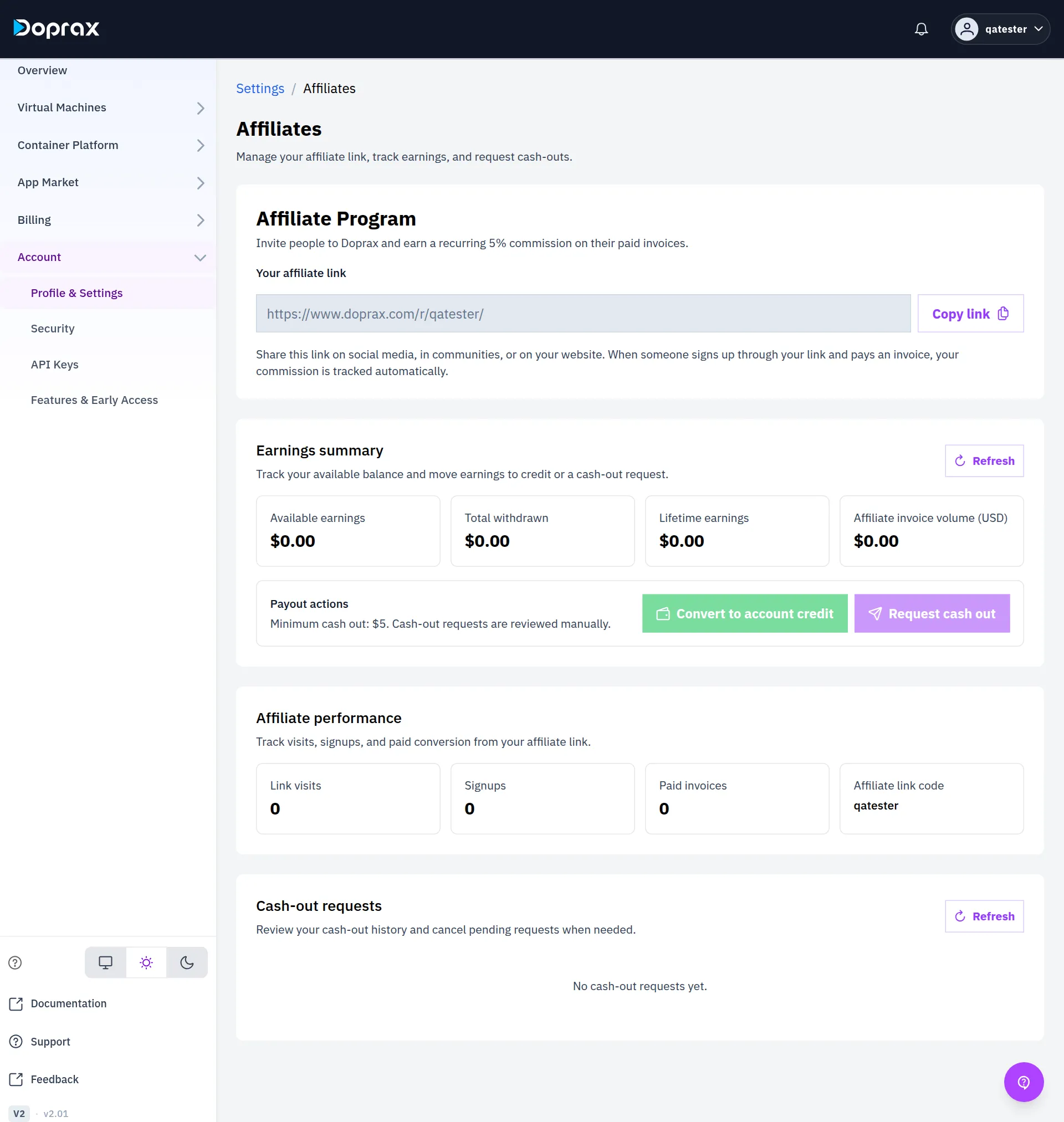
Every Doprax account has an affiliate link. When someone signs up through your link, you earn 5% of every payment they make to Doprax, for as long as they keep paying.
Find your link
Section titled “Find your link”-
In the dashboard, open Account > Profile & Settings.
-
Open the Account & Security tab and select Open affiliates. The direct address is www.doprax.com/v/settings/affiliates/.
-
Under Your affiliate link, select Copy link.
The link has the form https://www.doprax.com/r/your-username/. You do not have to create it.
How a referral is counted
Section titled “How a referral is counted”- A person opens your link. This is one Link visit.
- The person signs up within 30 days, in the same browser. This is one Signup.
- Each time that person adds credit, the payment is counted under Paid invoices and you earn 5% of it.
Only money paid to Doprax counts. Credit from a promo, credit added by our team, and affiliate earnings that a person converts to credit earn no commission.
The numbers on the screen
Section titled “The numbers on the screen”| Number | Meaning |
|---|---|
| Available earnings | What you can convert or cash out now |
| Total withdrawn | What you have already converted to credit or been paid |
| Lifetime earnings | Your commission since the start |
| Affiliate invoice volume (USD) | The total your referred users have paid |
| Link visits | How many times your link was opened |
| Signups | How many people signed up through it |
| Paid invoices | How many payments those people have made |
| Affiliate link code | The last part of your link. It is your username |
Available earnings is Lifetime earnings, minus Total withdrawn, minus any cash-out request our team is processing.
Turn earnings into credit
Section titled “Turn earnings into credit”Convert to account credit moves all your available earnings to your Doprax credit at once. You can then spend it on any service.
- You can convert once an hour.
- You cannot convert while a cash-out request of yours is pending.
Cash out
Section titled “Cash out”You need at least $5 in Available earnings.
-
Select Request cash out.
-
Check the Amount (USD). It starts at your available earnings. You can lower it, but not below $5.
-
Type the PayPal email the money should go to.
-
Select Submit request.
Cash-out requests are reviewed by our team by hand. You can have one pending request at a time.
The Cash-out requests table shows each request and its status.
| Status | Meaning |
|---|---|
| Pending | Waiting for our team. You can still cancel it with the bin button under Actions |
| Processing | Our team is paying it. The amount has left Available earnings |
| Completed | It has been paid and is counted in Total withdrawn |
| Rejected | It was not paid. The amount stays in Available earnings |
Checked against the product on 12 October 2026.