

What the App Market is
The App Market is a list of ready-to-run apps. You choose an app and one of your virtual machines, and Doprax installs the app on that VM for you. You can also add an app of your own.
On 12 October 2026 the App Market listed 24 apps, all of them for virtual machines: VPN and proxy panels, WordPress, code-server, Ollama, Vaultwarden, MongoDB, Home Assistant and others.
Open the App Market
Section titled “Open the App Market”In the dashboard menu, select App Market, then Blueprint Marketplace: https://www.doprax.com/v/blueprints/marketplace/
The dashboard calls an app in the market a “blueprint”. The menu has two items under App Market:
| Menu item | What it is for |
|---|---|
| Blueprint Marketplace | The list of apps. You install, review and add apps from here |
| Publisher Profile | The public page about you as a publisher of apps |
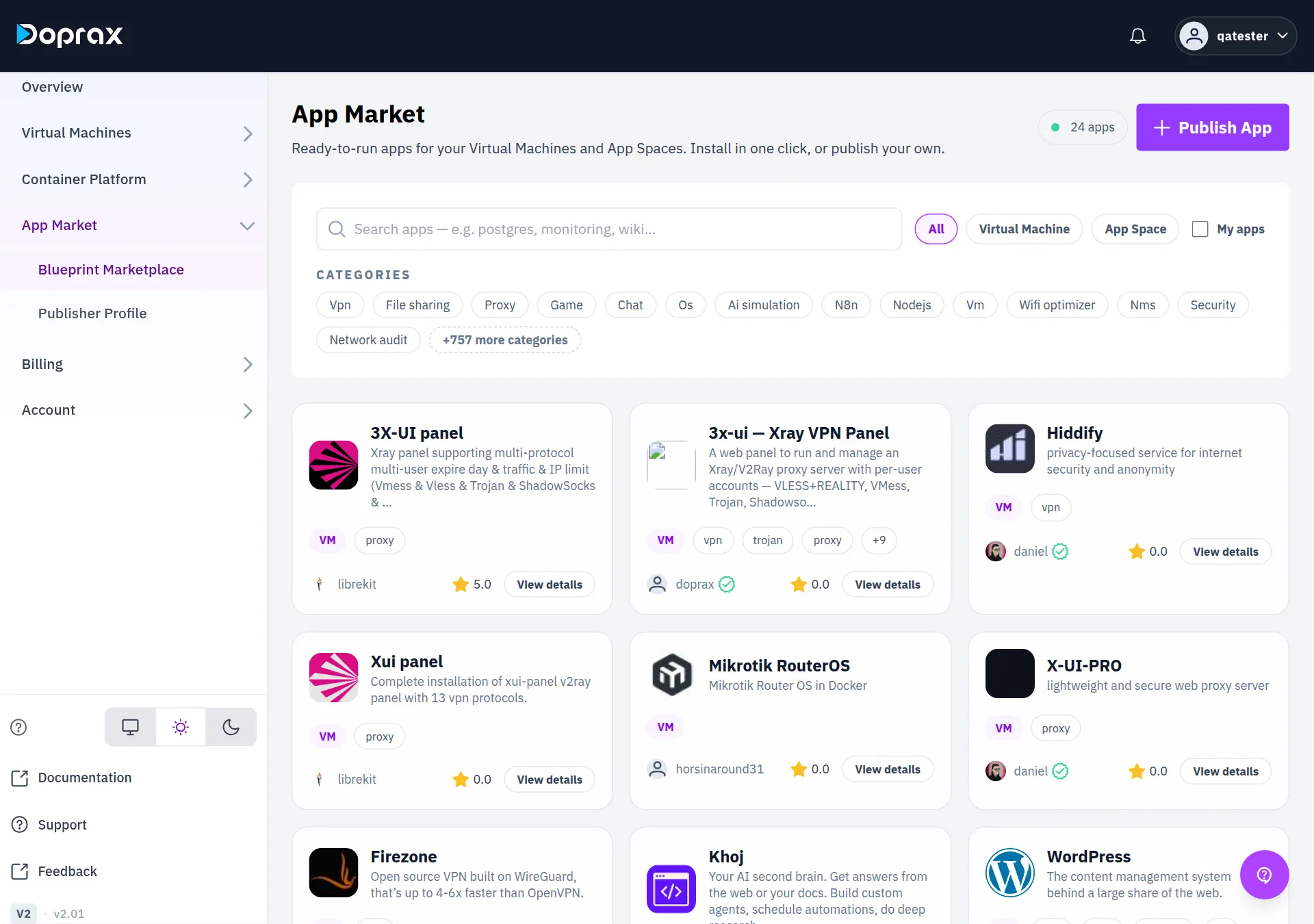
What a card shows
Section titled “What a card shows”| On the card | What it means |
|---|---|
| Name and a short description | The publisher’s own text |
| VM or App Space | Where the app is meant to be installed |
| Up to three tags, then +N | The app’s categories. +N counts the tags that are not shown |
| A user name | The publisher. Select it to open their publisher profile |
| A star and a number | The average of all reviews, from 0.0 to 5.0. An app without reviews shows 0.0 |
| View details | Opens the app’s page |
Apps with reviews come first, the best rated at the top. Apps without reviews follow, the most installed first.
What an app’s page shows
Section titled “What an app’s page shows”| Part | What it shows |
|---|---|
| Top of the page | Name, Virtual Machine or App Space, description, tags |
| The star | The average rating |
| N uses | How many times the app was installed with success |
| N issues | How many issues were reported on the app, open or not |
| View repository | A link to the app’s source repository, when it has one |
| ABOUT | The publisher’s description of the app |
| GUIDELINES | The publisher’s notes on installing and using it. “No guidelines provided.” when empty |
| ACCESS | How you reach the app after the install. “No access instructions provided.” when empty |
| REVIEWS | The three newest reviews, and Write review |
| ISSUES | The six newest issues, and Report issue |
| The bar at the bottom | Install, with a list of your VMs |
When you have installed the app, the page also shows YOUR INSTALLATIONS: the VMs you installed it on, with the address and passwords of each install.
- To install an app: Install an app on a VM.
- To rate an app or report a problem: Reviews and issues.
Who publishes the apps
Section titled “Who publishes the apps”The name on a card tells you who published the app. There are two kinds.
Apps published by doprax. Doprax maintains these itself. The card shows the name doprax with a
green tick. This publisher has no profile page.
Apps published by other customers. The card shows the customer’s user name. Doprax installs
such an app by running the Ansible playbook from the publisher’s GitHub repository on your VM, as
the root user. The playbook is written by the publisher, not by Doprax. Before you install, open
View repository and read what it does, and read the app’s ISSUES.
What it costs
Section titled “What it costs”Installing an app is not charged. An app has no price, and an install takes nothing from your credit.
You pay for the VM the app runs on, by the hour, as for any VM. See What a virtual machine costs.
Limits
Section titled “Limits”- Apps for App Spaces cannot be installed today. The App Space filter exists, but it shows no app on production. The install bar only installs on virtual machines: for an App Space app it shows “This app targets App Spaces” and no Install button.
- The dashboard asks for nothing but the VM. There are no fields for settings such as a domain or a port. Values an app needs are taken from its defaults, and its passwords are generated.
- There is no uninstall. The dashboard cannot remove an app from a VM. See Remove an app.
- Nothing checks that the app fits your VM. The operating system and the size of the VM are not checked before an install starts.
- Adding your own app does not list it for other customers. See Publish an app.
Checked against the product on 12 October 2026.