
VPN ≠ VPN
What surprises a lot of people the first time they try it is how differently various VPN setups behave on real-world networks. Two servers running "a VPN" can have completely different reliability on hotel Wi-Fi, corporate guest networks, mobile carriers, or any network that does some form of traffic inspection. The difference usually comes down to the protocol.
This post walks through how modern VPN protocols compare from a detection and reliability standpoint, and what that means if you're deploying one yourself.
Why managed VPN services can be flaky
Before getting into protocols, it's worth understanding why commercial consumer VPNs sometimes stop working on particular networks. A few structural reasons:
Shared IP ranges
Large VPN providers rent IP space from a small pool of datacenter operators. Those ranges are well-known and often end up on blocklists used by streaming services, banks, corporate firewalls, and public Wi-Fi providers. Your tunnel works fine; the destination just refuses traffic coming from that subnet.
Control-plane dependencies
Many commercial clients phone home to a login or config server before they establish the tunnel. If that control plane is unreachable — or gets filtered — the client fails to connect even when the VPN servers themselves are up.
Protocol fingerprints
Most commercial services default to standard protocols that are easy to identify with deep packet inspection (DPI). Networks that filter by traffic class, not just by destination, can tag and drop these flows.
A self-hosted VPN sidesteps the first two problems automatically: you pick your own IP, and there's no third-party control plane. The third one — fingerprinting — is where protocol choice becomes interesting.
The four tiers of VPN protocols
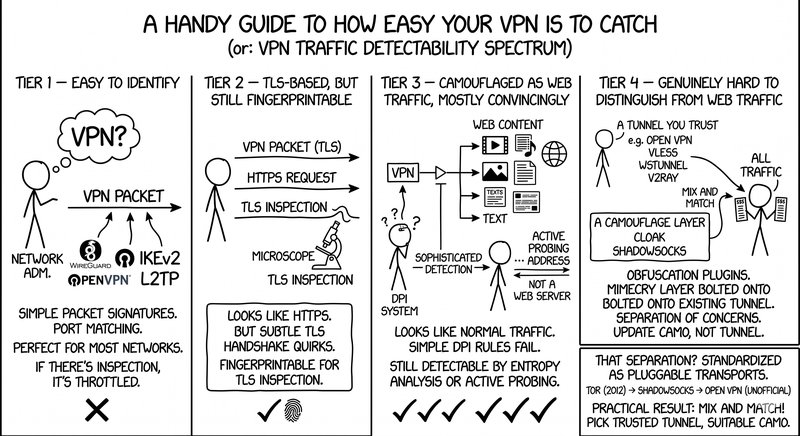
It's useful to sort VPN protocols by how easy they are to distinguish from ordinary traffic. Think of it as a spectrum from "obviously a VPN" to "indistinguishable from a normal web request."
Tier 1 — easy to identify
WireGuard, OpenVPN in UDP mode, IKEv2, and legacy protocols like L2TP. These have simple, stable packet signatures; some can even be matched on port number alone. Perfectly fine on networks that don't filter by traffic class, which is most networks. But if a network does any protocol-level inspection, these are the first to get dropped or throttled.
Tier 2 — TLS-based, but still fingerprintable
Protocols that wrap themselves in TLS, like OpenVPN in TCP mode or standard SOCKS proxies. In principle they should look like HTTPS. In practice the TLS handshakes have subtle quirks that distinguish them from real browsers, and those quirks make decent fingerprints for anyone doing TLS inspection.
Tier 3 — camouflaged as web traffic, mostly convincingly
Protocols like OpenConnect/AnyConnect, OpenVPN with the XOR patch, Shadowsocks, and SoftEther tunnels. They look a lot like normal web traffic, and simple DPI rules won't catch them. More sophisticated detection can still succeed though — for example by analyzing the statistical entropy of headers, or by "active probing," where the inspecting system itself tries to open the same destination as a normal web client to see if it behaves like a real web server.
Tier 4 — genuinely hard to distinguish from web traffic
This is where modern obfuscation plugins live: v2ray, VLESS, wstunnel, Cloak, and others. These aren't VPN protocols on their own — they're mimicry layers you bolt onto an existing tunnel. The design separates "the thing carrying your data" from "what the thing looks like on the wire," and it lets you update one without touching the other.
That separation got standardized as Pluggable Transports, an interface originally designed for Tor in 2012. Shadowsocks added support later, and in the last few years OpenVPN has gained unofficial Pluggable Transport support as well. The practical result is that you can mix and match: pick a tunnel you trust, pick a camouflage layer that suits your network environment, and combine them.
Cloak, and why the "donor website" idea is clever
Cloak (by Andy Wang / cbeuw on GitHub) is worth calling out because it takes the mimicry idea further than most. Older tools like obfs4 randomize traffic so it doesn't look like any particular protocol. Cloak does something more active: you configure a donor website, and when anyone who isn't a valid client connects to your server, they get served that site's real content.
Concretely, if someone probes your server without the right handshake, they get what looks like an ordinary website — because that's what your server is also serving. The real VPN clients authenticate via a hidden handshake the probe doesn't know about. To outside observers, your host is indistinguishable from a vanilla web server.
It isn't magic. A poorly configured TLS certificate will still give you away — but it's probably the most robust obfuscation approach widely available in open-source form today.
Putting it together on your own VM
The nice thing about self-hosting is that you can choose exactly the stack you want, and change it later if a particular network gives you trouble. A reasonable setup on a cloud VM might look like:
- A VM with a clean IP. Any general-purpose VM on a developer-focused cloud works; you just want somewhere you control the networking and can expose the ports you need. (This is a natural fit for a Doprax VM, which gives you a dedicated IP and lets you spin up and tear down instances per-hour.)
- A tunnel protocol. WireGuard is fast, modern, and easy to configure — a great default when you're not worried about DPI. OpenVPN is a solid fallback when you want more flexibility in how it's wrapped.
- An obfuscation layer, if needed. If your target network does any protocol inspection, put Cloak or a similar pluggable transport in front of the tunnel and run it on TCP/443. To outside observers, your server looks like it's serving a website.
Projects like AmneziaVPN package this whole stack — WireGuard, OpenVPN, IKEv2, Shadowsocks, and OpenVPN/Shadowsocks over Cloak — with a point-and-click installer that connects to your server over SSH and deploys each service in its own Docker container. Each container exposes a single port and speaks a single protocol, which keeps the setup auditable. The project is open source, and went through an independent security audit by 7ASecurity (funded by the Open Technology Fund) with a public report.
You can also assemble the pieces yourself. Docker images for WireGuard, OpenVPN, Shadowsocks, and Cloak are all maintained and well-documented, and any cloud VM with a public IP is enough to host them.
Practical takeaways
A few things worth keeping in mind if you're deploying a VPN for yourself or a small team:
A single protocol is a single point of failure. It's cheap to run more than one — for instance WireGuard for speed on normal networks, plus a Cloak-wrapped fallback for the cases where plain WireGuard gets filtered. Flip between them as needed.
Stable, unlisted IPs matter more than most people think. A dedicated IP on a VM you control won't be on any commercial VPN blocklist, which tends to be the actual cause of "why does this site not load over my VPN" complaints.
And if you care about the tunnel actually being private, self-hosting on infrastructure you control is a much stronger story than trusting any provider's no-logs claim. The server, the keys, and the logs (if any) all belong to you.
Whether you use a packaged tool like AmneziaVPN or roll your own stack out of Docker images, the economics have shifted. A personal VPN used to mean either paying a subscription or managing a server carefully by hand. On a modern developer cloud, it's closer to a ten-minute project.