
What CHR actually is
MikroTik makes networking gear that network engineers trust because it does serious work for very little money. RouterOS is the operating system that runs on it. Cloud Hosted Router (CHR) is the version of RouterOS built to run as a virtual machine instead of on a physical box.
It has the full RouterOS feature set. The same firewall, the same VPN stack, the same routing engine you would get on a physical MikroTik device, running on a VM with a clean IP and a 1Gbps port.
What you do with it
CHR is a software router, which means it handles the jobs a router handles:
- VPN server. WireGuard, OpenVPN, L2TP, and IPsec are all built in. Run your own VPN without a third-party panel.
- Firewall. Put RouterOS in front of your cloud servers and filter traffic with Layer 7 rules, dynamic address lists, and connection tracking.
- Bandwidth management. Shape traffic, set per-user limits, and prioritize what matters.
- HTTP proxy. Filter by domain, cache content, control outbound access.
- Site-to-site routing. Connect networks across locations over encrypted tunnels.
If you have run any of this on physical MikroTik hardware, the configuration is identical. WinBox, WebFig, and the command line all work the same way.
Why ProVM is a good home for it
A router lives and dies by its network. ProVM gives CHR three things that usually break first on cheaper hosts:
- A clean dedicated IP, so your VPN and proxy traffic does not inherit a flagged address.
- A 1Gbps port with unlimited traffic, so bandwidth caps do not throttle you mid-month.
- Provisioning in under a minute, so you are configuring the router, not waiting on it.
ProVM starts at $8.95/month for 1 vCPU and 1GB RAM, billed hourly. That is enough for a VPN or firewall router serving a handful of users.
The one thing to know about licensing
CHR uses MikroTik's own licensing, separate from Doprax. You bring your own.
The free license works, but caps throughput at 1 Mbps. Fine for testing the config, not for production.
MikroTik offers a 60-day free trial of the paid license levels, which unlocks full speed. After that, a P1 perpetual license is a one-time purchase of around $45 and never expires. Licenses are tied to your MikroTik.com account, not the hardware, so you can move a license to a new instance if you rebuild.
So the honest path: deploy, test on the free tier, then activate a trial or buy a P1 from your MikroTik.com account before you go live.
Deploy it
- Create a ProVM from the dashboard.
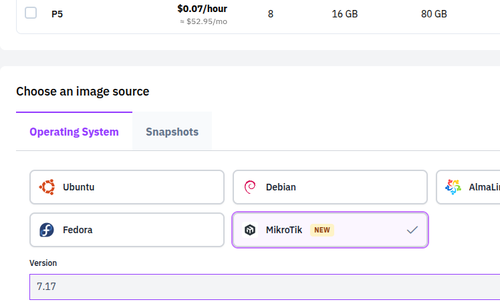
- Choose MikroTik as the image source. Version 7.17 is the current image.
- Wait about a minute for provisioning.
- Log in with WinBox or WebFig using the IP and credentials from the dashboard.
- Activate your license under System → License when you are ready for full speed.
Full setup walkthrough → [tutorial]